As a Charge Point Operator (CPO), E-Mobility Service Provider (EMP), or Fleet Operator, you need flexibility and control when setting up and managing charging tariffs. The custom plan in Virta Hub gives you full control to tailor pricing across organisations, locations, or specific pools.
With Virta Hub’s custom plan, you can:
- Tailor pricing to suit specific markets, customers, regions, or locations.
- Maintain control by deciding which organisations or pools each tariff applies to.
- Avoid accidental free charging with built-in safeguards through default plans.
- Scale efficiently; new sub-organisations automatically inherit the parent’s default plan pricing. Thus, minimising the risk of accidental free charging.
- Save time by duplicating and reusing tariff structures instead of building them from scratch.
- Updates Tariffs in batches by editing tariffs within a custom plan, ensuring all assigned organisations or pools receive updated pricing instantly and consistently.
Custom plan empowers you to create a smarter, safer, and more adaptable tariff strategy across your entire charging network.
This means:
- No manual updates to each CPO or pool
- Consistency across regions or location groups
- Time saved during large-scale or frequent pricing changes
- Faster reaction to competitor pricing, energy costs, or market demand
Batch updating transforms pricing management from individual edits to efficient, system-wide updates, reducing administrative workload and ensuring accuracy across your charging network.
Note:
If the custom plan feature is not yet visible in your Virta Hub account, your organisation is operating on the previous pricing system. An automatic upgrade will be applied in the near future (by February 2026).
In this guide, we will cover:
- Tariff plans overview
- How it all works
- Managing custom plans
- Frequently asked questions
1. Tariff plans overview
Tariff plans define how charging sessions are priced, and who those prices apply to.
1.1. Default plan
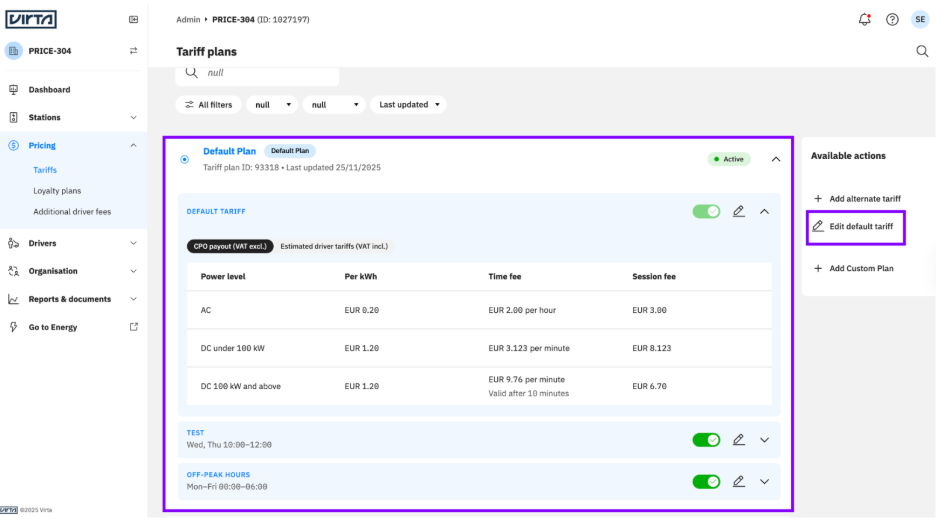
Your default plan is the foundation of tariff management. It’s always active, applies to all stations in your organisation, and ensures that there are always tariffs in place.
- It has no end date. It can be edited but cannot be deleted.
- Automatically applies to all stations, sub-organisations, and pools.
- Every organisation must have one.
- When you create a new sub-organisation, it automatically copies the parent organisation’s default plan settings, keeping your pricing consistent and reducing setup effort.
Each default plan includes:
- A default tariff, always active.
- Optional scheduled tariffs (formerly alternate tariffs), for specific days or time periods.
1.2. Custom plan
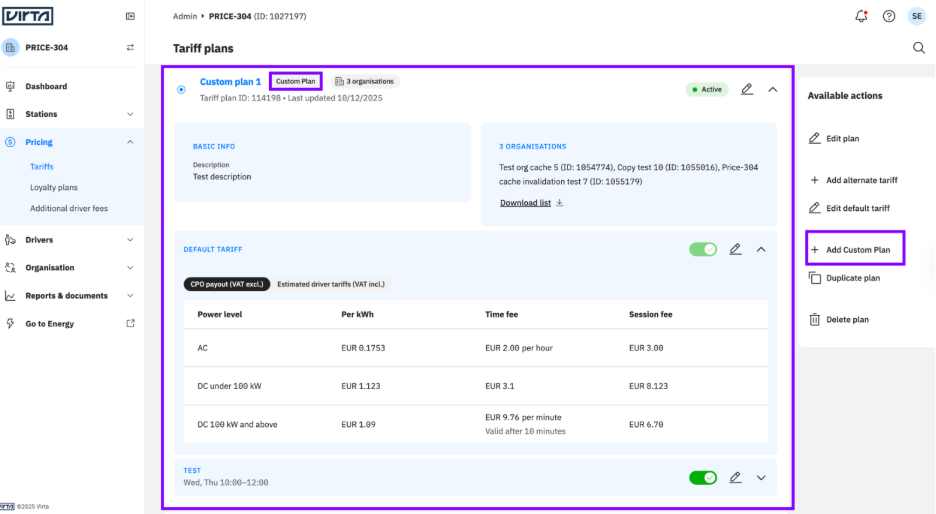
Your custom plan gives you flexibility. It allows you to apply different tariffs to:
- Specific organisations
- Specific pools
Use it when you want to:
- Set regional pricing
- Give partner-specific pricing
- Adjust tariffs per charging location
- Introduce time-limited special tariffs
Key things to know:
- Once it is active, a custom plan overrides the default plan for any participant assigned to it.
- You can define:
- Which charging stations does it apply to (CPOs, sub-organisations, or specific pools).
- What tariffs does it include (default tariffs and/or scheduled tariffs)
Priority order:
- Custom plan with Pool participants
- Custom plan with CPO participants
- Default plan
Pool-based custom plan
With the Pool-based pricing, you can assign tariffs directly to individual locations.
Pool-based custom plans empower you:
- React to competitor pricing per location
- Increase or lower the charging price based on demand
- Avoid complex organisational structures
- Create micro-tariffs for specific high-traffic areas
This gives you full control over your pricing strategy.
1.3. Loyalty plan
A loyalty plan lets you to offer:
- Special pricing to certain EMPs or driver groups
- Discounts for frequent users
- Surcharges for specific conditions
2. How it all works
Virta Hub is designed to keep tariff management simple, reliable and flexible.
- Every organisation always starts with a default plan
- You can then layer custom plans for specific organisations or pools.
- Each plan can be edited, deactivated, activated, or duplicated to save time.
- Built-in validations prevent incorrect configuration or free charging.
3. Managing custom plans
3.1. Prerequisite
Before you can create custom plans, you’ll need a default plan in place.
If You’re a Parent Organisation:
- Navigate to the Pricing tab in Virta Hub.
- Select Create default plan.
- Add your default tariff and scheduled tariffs.
- Save your changes, and your default plan becomes active immediately.
If You’re a Sub-Organisation:
- Your default plan is automatically copied from your parent organisation.
You can still edit it later to match your local needs.
Tip: Keep your default plan updated. It’s your backup for all stations, ensuring uninterrupted tariff coverage.
3.2. Creating a custom plan
Once your default plan is active, you can proceed to create a custom plan.
A custom plan allows you to define specific tariff rules for selected participants within your organisation.
- Participant Options
By default, you can create a custom plan with organisations as participants.
This means you can assign the plan to one or more CPOs or sub-organisations within your hierarchy to apply unique tariffs to them.
Note
Please note that, when both participant types are enabled, the priority order of tariff plans applies as follows:
- Custom plan with Pool participants
- Custom plan with CPO participants
- Default plan
How to create a custom plan
Step 1: Confirm Your default plan
A custom plan can only be created if your default plan exists.
Step 2: Create Your custom plan
- Navigate to Manage Your Plans or the In Use.
- Click Add custom plan.
- Fill in: Plan name and description.
4. Click preview tariffs. These tariffs are copied from your default plan by default.
5. Select Participants
- Organisations
- Pools
6. Publish your plan:
- Save as inactive (for future use), or
- Activate it immediately
System validations
Virta Hub prevents errors during setup:
- Overlapping participants:
You can publish a custom plan even if its participants overlap with an existing active custom plan.
However, you cannot activate the new custom plan until the overlap is resolved. - Currency or pricing mismatches:
You can only select participants using the same currency and pricing system.
3.3. Editing your plans
You can edit any plan directly from the Manage Your Plans page.
Editing a default plan
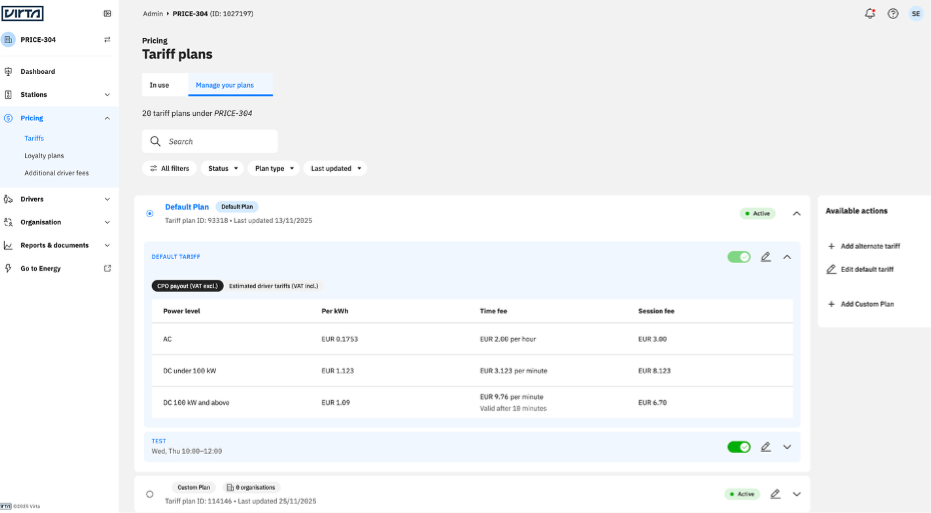
You can:
- Edit the default tariff or scheduled tariffs. Default plans can’t be deleted.
- Add new scheduled tariffs
Editing a custom plan
You can:
- Edit plan info, including name and description
- Update participant lists
- Adjust tariff details
- Activate, deactivate, or delete the plan
Tip: Publish the custom plan as Inactive if you are testing new configurations. Then activate when ready.
Check tariffs in station view
You can quickly preview the tariffs applied to each pool directly from the Stations view. Navigate to Stations > All stations, then select any pool to open its Pool Overview.
Under the Pool usage section, there is a Tariffs link that displays the tariffs currently applied to that pool. You can click the Go to tariff plan button at the bottom to navigate to the Tariffs view and edit the plan, provided you have the required edit permissions.
3.4. Duplicating a custom plan
To create a new plan based on an existing one:
- Go to Manage Your Plans.
- Select the custom plan you want to duplicate.
- Click Duplicate Plan.
4. The duplicated plan appears as Inactive
5. Update it as needed and activate it when ready.
This saves you from re-entering participants or tariff details from scratch.
4. Frequently asked questions
- What user roles can edit tariffs on Virta Hub?
Only users with the role Administrator, Driver Manager, Charging Manager, or Financial Support roles can create, edit, or delete tariffs and plans on Virta Hub. - Why do I need a default plan?
Your default plan ensures every station has a tariff to use or to fall back on, preventing accidental free charging. - Can I delete my default plan?
No. It’s required, but you can edit it at any time. - How do I know if my changes are active?
Each plan has a status indicator:
Active: currently applied
Inactive: saved but not applied - Can I assign a custom plan to multiple organisations at once?
Yes, as long as they use the same pricing system and currency. - What if two custom plans overlap?
Virta Hub flags an overlap and prevents activation until it is resolved; only one can be active at a time for the same participant. - Can I apply custom plans to specific pools?
Yes, this provides you with the flexibility to allocate different tariffs for different pools under your organisation. - How is a loyalty plan different from a custom plan?
A loyalty plan adjusts existing tariffs for targeted user groups (e.g., discounts), while a custom plan defines its tariffs for specific organisations and/or pools. - Is there version control for tariffs?
Virta keeps a record of plan versions. - Can I export tariff plans for reporting or compliance?
Yes. You can export tariff data from the Manage Your Plans section for review or compliance reporting. - Is there version control?
Virta Hub maintains a record of tariff plan versions for auditing.
That’s it. You now know how to:
- Set up your default plan to guarantee tariff coverage across your network.
- Create and manage custom plans for specific organisations, partners, or pools.
- Edit, duplicate, and activate plans with full control.
- Avoid configuration errors through built-in system validations.
With mastering tariff management, you can ensure your charging network always operates under the right pricing, for the right customers, at the right time, empowering you with both flexibility and reliability in your operations.
If you have any questions or need help managing your tariffs, your Customer Success Manager or our Support team are always happy to help.
Related to